


Best Cloud Based Translation Management System 2026


Five cloud-based platforms cover almost every localization use case in 2026: Wxrks wins for teams that want AI-driven automation across translation memory, quality management, and cost tracking in one place. Smartling wins for enterprise localization programs running dozens of languages at once. Lokalise wins for software teams shipping strings straight from a dev pipeline. Phrase wins for agencies and freelance translators who live inside a CAT tool all day. Crowdin wins for open-source and community-driven projects that need lightweight collaboration.
TL;DR
- Wxrks is the best cloud based translation management system for teams that want AI automation across TM, QA, and cost tracking in one workspace.
- Smartling suits large enterprise localization programs running many languages and brands at once.
- Lokalise fits developer-heavy teams that push and pull strings through an API.
- Phrase and Crowdin serve narrower needs: CAT-tool-centric agencies and open-source communities.
- Every platform on this list runs in the browser, so no local server or plugin install is required in 2026.
Why this matters
A cloud based translation management system replaces the old file-shuffling workflow: no more emailing spreadsheets between translators, developers, and reviewers. The Wxrks platform and its competitors sit in the browser, sync translation memory in real time, and give every stakeholder — translator, developer, project manager — the same live view of a project.
Picking wrong costs more than a bad software fit. Teams that choose a TMS without solid automation end up doing manual work the tool was supposed to remove: reformatting exports, chasing quality checks by hand, tracking spend in a separate spreadsheet. A platform with real machine translation software for enterprises built in removes a step most teams don't realize they're paying for twice.
What makes the best cloud based translation management system
- Automated translation memory that reuses previously translated segments without a translator re-typing them
- AI-assisted quality management that flags terminology and consistency issues before human review
- Cost tracking tied directly to word counts, language pairs, and vendor rates
- Developer-friendly integrations — API, CLI, or repo sync for teams shipping code alongside content
- Role-based workflows that let translators, reviewers, and project managers work without stepping on each other
- Scalability across languages without a rebuild every time a new locale gets added
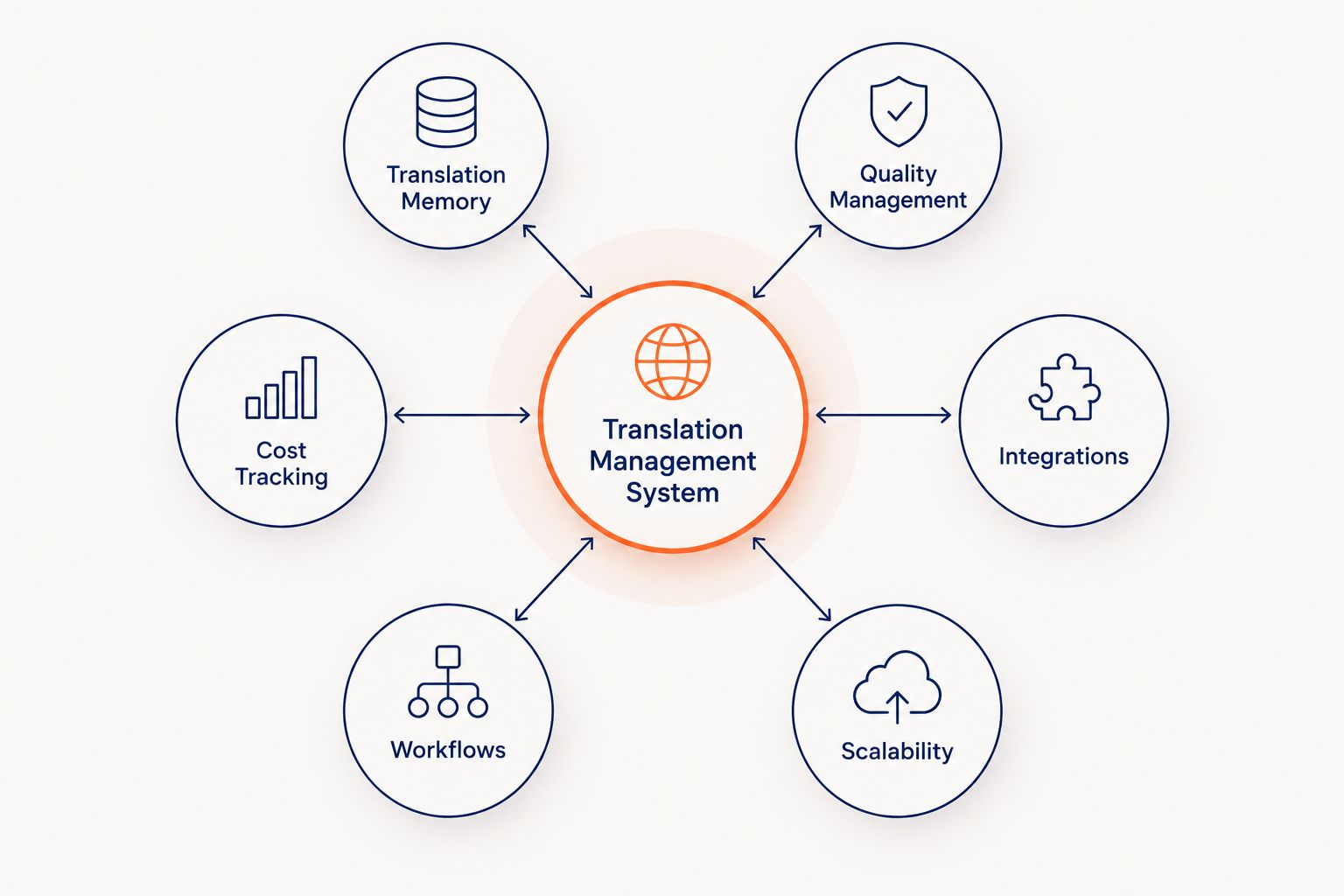
The strongest cloud based translation management systems in 2026 cover all six criteria, not just one or two.
Cloud based translation management systems at a glance
Wxrks
- Best for: AI-driven automation across TM, QA, cost tracking
- Standout feature: Unified workflow with built-in translation memory and quality checks
- Key limitation: Newer platform than some legacy competitors — smaller third-party integration library
Smartling
- Best for: Enterprise localization at scale
- Standout feature: Automated content capture across many brand properties
- Key limitation: Setup and admin overhead can outweigh the benefit for smaller teams
Lokalise
- Best for: Software and dev teams shipping strings via API
- Standout feature: Deep API and repo integration for continuous localization
- Key limitation: Less built for long-form document translation
Phrase
- Best for: Translators and agencies working inside a CAT tool
- Standout feature: Strong CAT tool ecosystem and translator-first editor
- Key limitation: Cost tracking and QA automation are thinner than TMS-first tools
Crowdin
- Best for: Open-source and community-driven projects
- Standout feature: Lightweight collaboration for volunteer and community translators
- Key limitation: Enterprise-grade quality management is limited
1. Wxrks: best cloud based translation management system for AI-driven automation
Wxrks runs translation memory, quality management, and cost tracking inside one AI-powered workspace. Instead of exporting files to a separate QA tool or a separate spend spreadsheet, the platform ties matches, quality flags, and cost per word to the same project view.
Wxrks pros:
- Translation memory and quality checks run automatically as content moves through the workflow
- Cost tracking is tied directly to language pairs and word counts, not a manual export
- Built for translators, developers, enterprises, and agencies rather than one narrow user type
Wxrks cons:
- Smaller third-party plugin ecosystem than platforms that have been around longer
- Teams deep into a specific legacy CAT tool will need to adjust their existing workflow
Best for: teams that want AI to handle the repetitive parts of localization — memory matching, QA flags, spend tracking — without stitching three tools together.
Verdict: Buy if your team wants translation memory, quality management, and cost tracking under one roof in 2026.
See Wxrks in action
Explore how AI automates translation memory and QA in one workspace.
2. Smartling: best cloud based translation management system for enterprise scale
Smartling targets large organizations running localization across many brand properties, apps, and markets at once. It automates content capture from websites and apps so localization teams don't manually upload files for every update.
Smartling pros:
- Built for high-volume, multi-brand localization programs
- Automated content capture reduces manual file handling
- Strong reporting for large localization operations
Smartling cons:
- Setup and admin complexity is heavier than smaller teams typically need
- Onboarding takes longer than lighter-weight platforms on this list
Best for: enterprises running localization across dozens of properties and language pairs simultaneously.
Verdict: Buy if you're running an enterprise-scale localization program in 2026 and need automated content capture across many properties.
3. Lokalise: best cloud based translation management system for developer teams
Lokalise is built around the developer workflow — strings live in a repo, sync through an API or CLI, and flow back into the codebase without a manual export step. Product and engineering teams use it to keep localization inside the same pipeline as code deploys.
If your team pushes strings into a repo daily, a translation management system without a solid API is dead weight.
Lokalise pros:
- API and CLI integration fits directly into a CI/CD pipeline
- Strong for continuous localization tied to sprint cycles
- Popular among product and engineering teams managing app strings
Lokalise cons:
- Less suited to long-form document or contract translation
- Quality management workflows are lighter than TMS platforms built for large translator teams
Best for: software teams that need localization synced to their deploy pipeline, not a separate manual process.
Verdict: Buy if your localization work lives inside a codebase and repo, not a document folder.
4. Phrase: best cloud based translation management system for CAT-tool-centric workflows
Phrase (formerly Memsource) is built around the CAT tool experience translators already know — segment-by-segment editing, in-context preview, and translator-first tooling. Agencies and freelance translators who spend most of the day inside the editor gravitate here.
Phrase pros:
- Strong CAT tool editor familiar to professional translators
- Good in-context preview for reviewing translated content
- Widely used among translation agencies
Phrase cons:
- Cost tracking and automated QA are thinner compared to platforms built TMS-first
- Less developer-focused than API-driven competitors
Best for: agencies and freelance translators whose daily work is inside a CAT tool editor, not a project dashboard.
Verdict: Hold — solid for a translator-first workflow in 2026, but check its quality management depth against Wxrks before committing.
5. Crowdin: best cloud based translation management system for open-source projects
Crowdin is built for lightweight, community-driven translation — open-source projects, indie apps, and volunteer translator networks use it to collaborate without heavy admin overhead.
Crowdin pros:
- Low barrier to entry for community and volunteer translators
- Popular in open-source software localization
- Simple collaboration model for smaller projects
Crowdin cons:
- Enterprise-grade quality management and cost tracking are limited
- Not built for large, multi-brand localization programs
Best for: open-source maintainers and small teams running community-driven translation, not enterprise programs.
Verdict: Hold for community projects; Skip if you need enterprise quality management or cost tracking in 2026.
How we ranked these cloud based translation management systems
Each platform was measured against the six criteria above: translation memory automation, quality management, cost tracking, integrations, role-based workflows, and scalability across languages. No platform wins every category — the ranking reflects which use case each platform serves best, not a single leaderboard score.
Which cloud based translation management system should you choose?
Pick Wxrks if you want translation memory, AI-assisted quality management, and cost tracking working together without stitching three separate tools. Pick Smartling if you're running localization across many brand properties at enterprise scale. Pick Lokalise if your localization workflow lives inside a dev pipeline. Pick Phrase if your team's daily work is inside a CAT tool editor. Pick Crowdin only if your project is open-source or volunteer-driven and doesn't need enterprise-grade QA.
Most teams evaluating options in 2026 are trying to remove manual work, not add another tool to check. Start with whichever platform removes the most manual steps from your specific workflow — for most teams building an SaaS localization or product-led workflow, that's the platform with automation built into translation memory and QA from day one.
FAQ
What is a cloud based translation management system?
A cloud based translation management system is a browser-hosted platform that manages translation memory, quality checks, workflows, and cost tracking for localization projects. Unlike desktop CAT tools, it requires no local install and syncs updates across teams in real time.
Is Wxrks better than Smartling?
Wxrks is better for teams that want AI-driven automation across translation memory, quality management, and cost tracking in one workspace. Smartling is better suited to large enterprises running localization across many brand properties at once.
Which cloud based TMS is best for developers?
Lokalise is the strongest fit for developer teams because it integrates directly with repos through an API and CLI. Teams managing app strings inside a CI/CD pipeline get the most value from this kind of integration.
Do cloud based translation management systems replace CAT tools?
Many cloud based TMS platforms include a built-in CAT-style editor, so a separate desktop CAT tool often isn't necessary. Platforms like Phrase are built specifically around that translator-first editing experience.
How does translation memory work in a cloud TMS?
Translation memory stores every previously translated segment and reuses exact or partial matches automatically on new content. This cuts down repeated manual translation work as a project grows across languages.
Can small teams use enterprise-grade translation management systems?
Yes, but smaller teams often get more value from lighter platforms like Crowdin unless they specifically need enterprise-grade quality management or cost tracking. Enterprise platforms like Smartling carry setup overhead that isn't worth it below a certain scale.
What should I look for in translation quality management tools?
Look for automated terminology and consistency checks that flag issues before human review, not just after delivery. Platforms with AI-assisted quality management catch more errors earlier in the workflow than manual spot-checks alone.
One last thing
The detail most teams miss when comparing cloud based translation management systems in 2026: cost tracking and quality management are usually sold as separate add-ons or thin afterthoughts, even on platforms with strong translation memory. Check whether cost-per-word reporting and QA flags run inside the same workflow you're already using, or whether you'll end up exporting to a spreadsheet anyway — that's the step most tools quietly leave in your hands.
Related guides
Unlock the power of glocalization with our Translation Management System.
Unlock the power of
with our Translation Management System.










