Smells Scoring
Smells reads each translated segment for meaning problems and gives it a confidence score. You decide what each kind of problem costs. Segments that pass your rule confirm on their own, and your reviewers get the rest.
 Named a Leader on G2for Translation Management Systems
Independently audited
Severity weights
Not saved yetChanges the meaning or breaks the content.
A clear error a reviewer would correct.
A small error that keeps the meaning.
Impact preview
31 work units · 912 segments
Average confidence
Segments by worst open smell
See it in 54 seconds
One smell found in one segment, the weight it carries, the preview of your last 90 days, and the rule that lets clean segments confirm.
Global teams run translation on wxrks






What teams ask us
Localization teams bring the same four requests to our calls, whether they run an enterprise program or a language service company.
Most of a pre-translated file comes back right. In The Edit Distance Report, 84 of every 100 suggestions from our AI were confirmed with no edit at all. Teams want their reviewers on the rest.
Clients and purchasing teams ask for a score, a threshold, and severities that match how they grade errors. With those, they can put a price on the work.
When a check flags everything, people stop reading it. A flag should mean what your team agreed it means.
Without a reader for the language, teams pay a second linguist for everything. A score per segment shows where a second look is worth it.
How it works
Pre-translation fills each segment from your translation memory, machine translation or AI. Smells then checks it for meaning errors, missing or invented content, untranslated text, numbers, placeholders and your project rules. Each problem is a smell, rated from Blocker to Info.
Each severity carries a weight you set. A segment’s score is the weight of its worst open smell, and 100% when there is none.
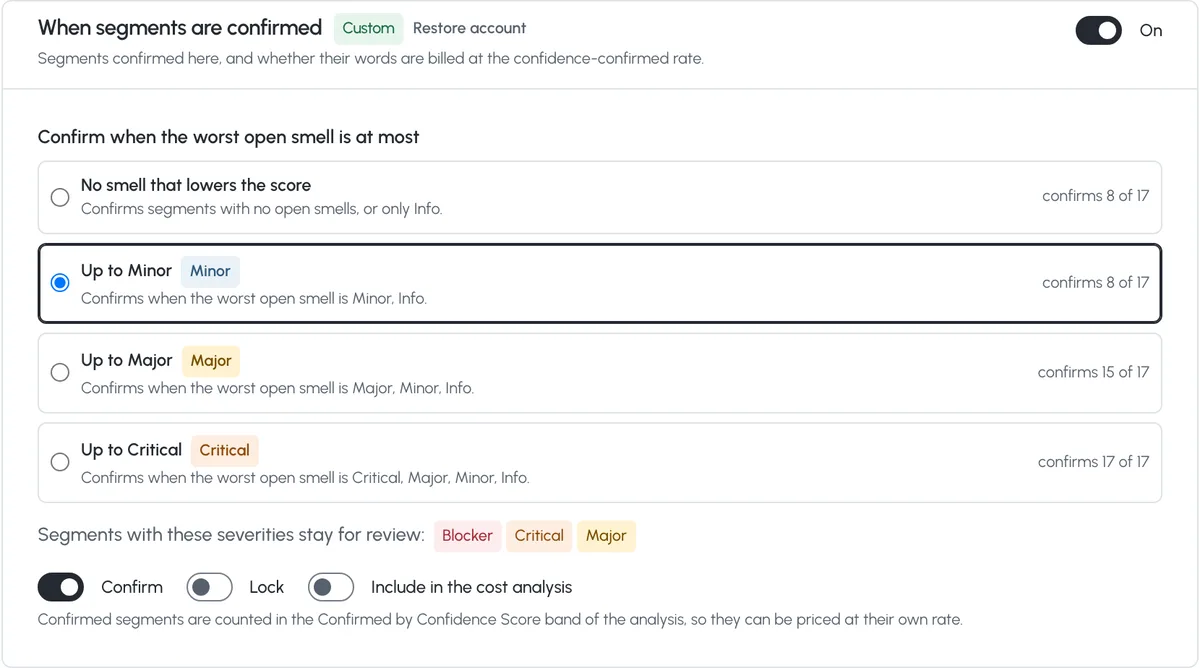
Choose the worst problem a segment may still have and be confirmed. Everything above that line stays for your reviewers.
In the editor
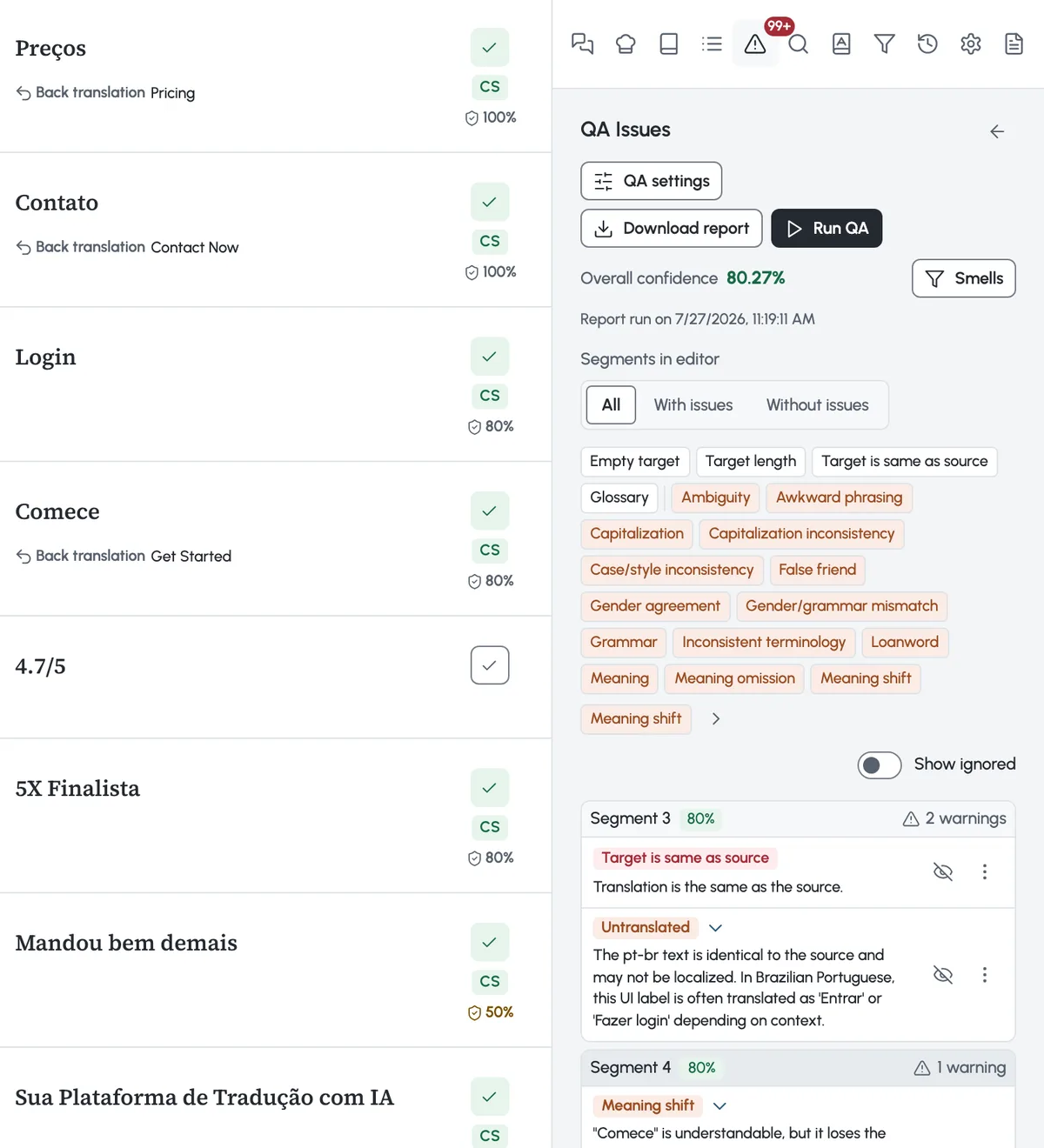
Translators and reviewers see each segment’s score beside it, and the smells behind it in the QA panel. Each smell names the problem and suggests a fix.
Your weights
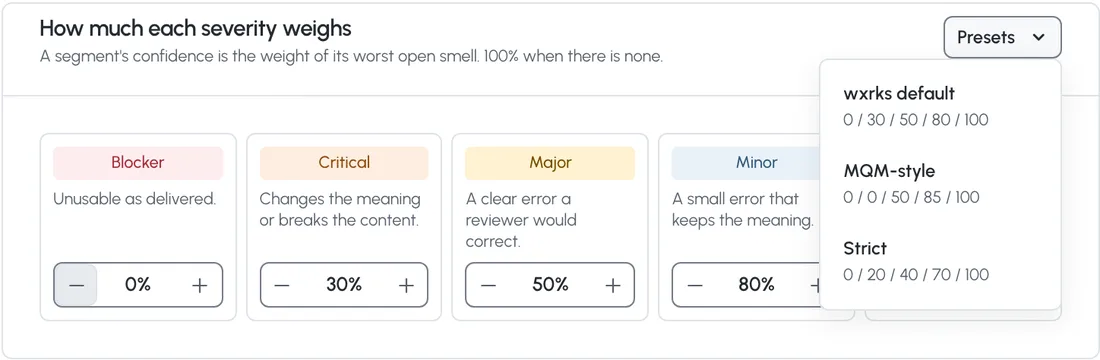
Set each severity’s weight in steps of 5%, or start from a preset, wxrks default, MQM-style or Strict. MQM is the industry’s common framework for grading translation errors by severity.
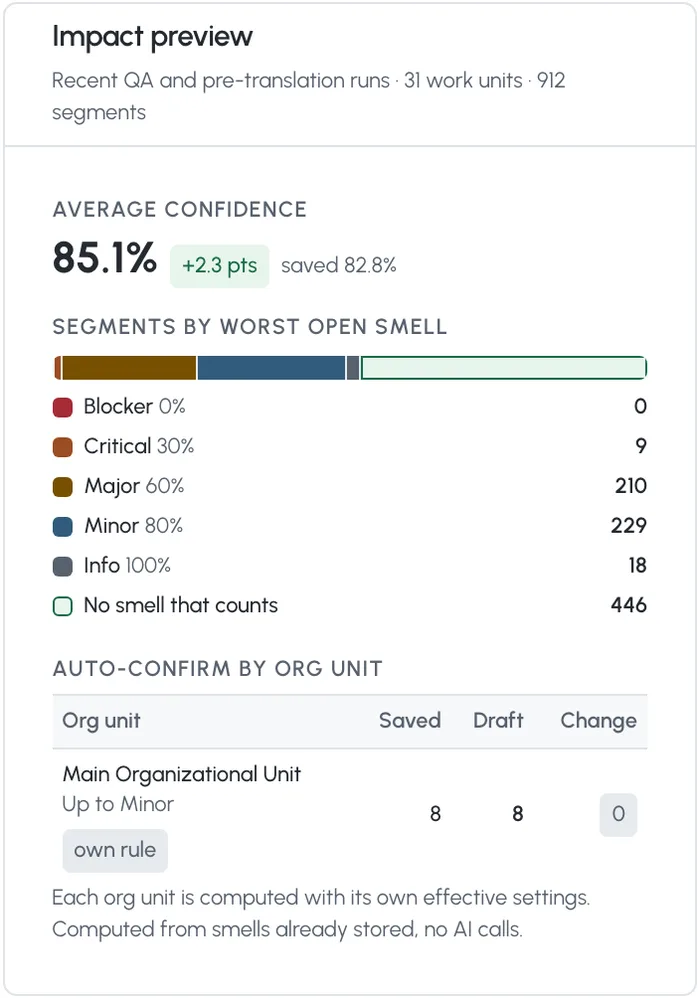
Impact preview
Every change runs on the quality checks and pre-translations of your last 90 days. The preview uses smells already stored, so it makes no AI calls and costs nothing.
On our demo account, raising Major from 50% to 60% moved the average from 82.8% to 85.1%.
Confirmation
Pick the worst problem a segment may still have and be confirmed. No smell that lowers the score, up to Minor, up to Major or up to Critical. Each option shows how many of your recent segments it would confirm.
Account, unit, project
The account sets the default. An Organizational Unit, the part of your account a team or a client works in, or a single project can change any part of it. The parts it leaves alone keep following.
Account Admins set the default for every team in Settings, Translation, Smells Scoring.
A business unit or a client keeps its own rule. Restore puts a part back to following the account.
A legal launch can be stricter than the help center, from the project’s own Smells Scoring tab.

Questions
No. You decide where the line sits, and every segment above it goes to your reviewers. The rule is off until you turn it on. You can start with No smell that lowers the score, watch the counts, and move the line when you are ready.
One serious problem makes a segment wrong, however clean the rest of it is. So smells are not added up. A segment with one Major and three Minor smells scores the same as one with only the Major.
No. It recalculates smells already stored from your last 90 days, so it makes no AI calls.
Translators can choose how much Smells shows them while they work, from Low to High. Scores and confirmation always use Standard, so the score is the same for everyone.
No. It is a set of weights, Blocker and Critical 0%, Major 50%, Minor 85% and Info 100%. Start from it and change any weight.
It was converted for you. A minimum above 80% became No smell that lowers the score, above 50% became Up to Minor, and above 30% became Up to Major. Confirm, Lock and the cost setting were kept.
No. They apply to quality checks from now on. Run the check again to score existing work with the new settings.
No. No customer content trains any model, and it is written into the data processing agreement.
By the volume you process, in one annual subscription. Your team, requesters and suppliers are not charged per seat. In enterprise plans, implementation, onboarding, training and asset import are included, so there is no first-year spike and no separate implementation invoice.
Book a demo
A 15-minute call first. Then a 30-day proof of concept on your real content, at no cost.
Named a Leader on G2for Translation Management Systems
Independently audited (SOC 2 Type 2)





