Quality Management

Match Every Translation’s Review to Its Risk

wxrks checks and scores every segment, then routes it by your rules. Low-risk content confirms on its own. High-stakes content goes to the reviewer you choose. Approved words stay as approved, and every reviewer edit is recorded with its reason.

Book a demo See it on your own content
G2 Leader badgeNamed a Leader on G2for Translation Management Systems Independently audited
(SOC 2 Type 2) since 2020
Rules for the account,
each unit and each project

Watch it work

Quality Checks You Can Watch

How Smells catches meaning problems before a file goes out, and how wxrks explains the choices its AI makes.
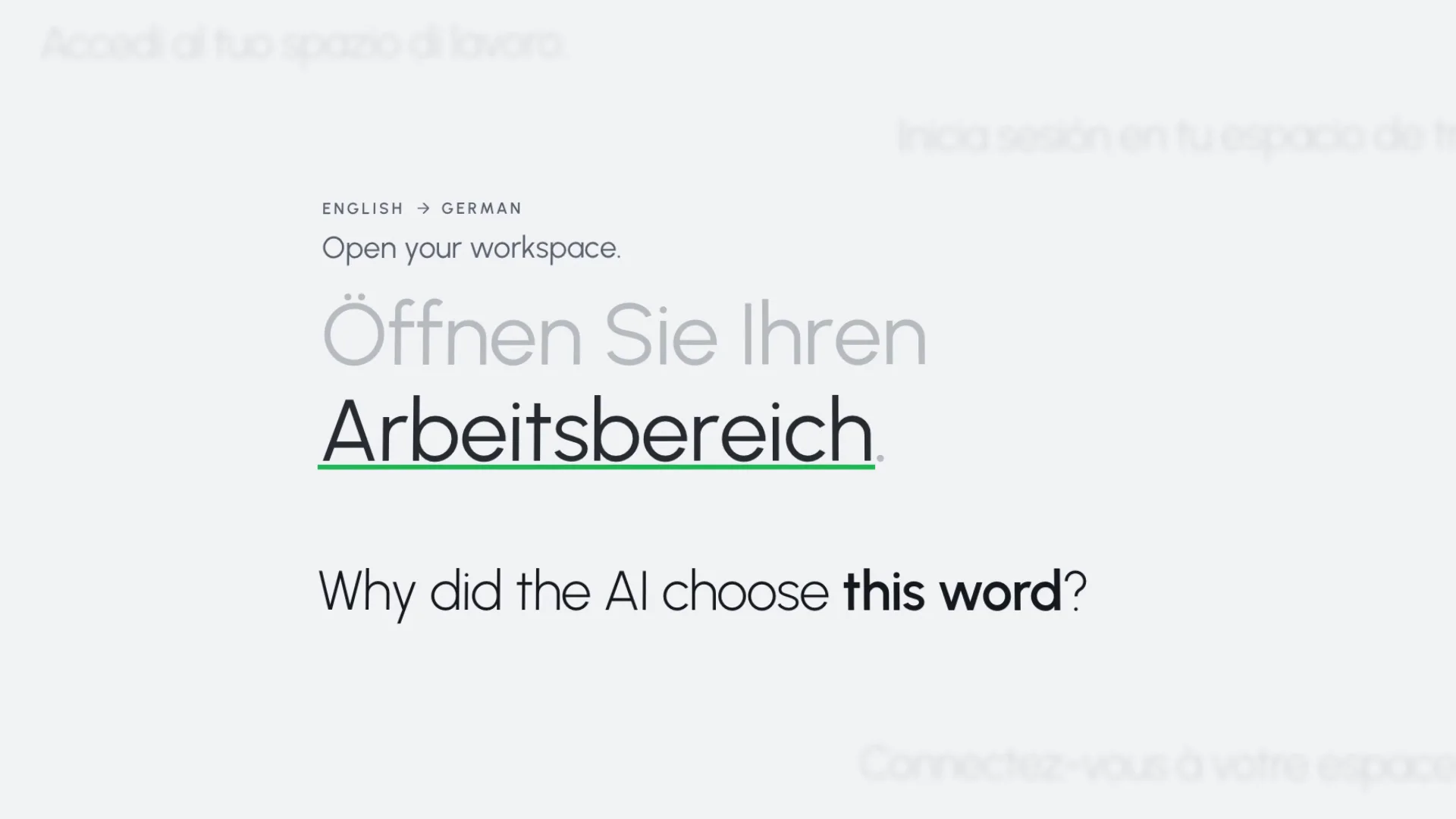
AI Smells Check. Foundations for Project Managers, wxrks.
Final QA with Smells2:15 · Foundations for Project Managers
wxrks. AI translation you can explain.
AI translation you can explain0:36 · The wxrks film

Global teams run translation on wxrks

Coca-Cola Europacific Partners Uber Zendesk Duolingo Harley-Davidson Omnicom Scaled Agile DataCamp Tag

Where the risk is

Put Review Where a Mistake Costs the Most

Localization teams in healthcare, life sciences, consumer products and software describe the same four situations on our calls. Most content can move fast. A few words cannot be wrong.

Safety and regulated terms

A medicine name patients in one country don’t recognize. A term a regulator prescribes word for word, where any other word makes the product non-compliant.

Approved words that must not move

Once legal or a market approves a sentence, no translator and no AI should improve it.

Who changed it, and why

When a sentence changes, teams need to see whether a person, the memory or the AI changed it, and what the reviewer called the change.

Something added or dropped

A missing sentence, an extra number, a line left untranslated. Easy to miss in review, hard to explain after launch.

Across the workflow

Quality Is Set and Measured at Every Stage

QA checks are one part. Before a project starts, you clean the memory and refine the glossary. While it runs, rules check, score, route and lock. After delivery, the data shows where quality moved.

SetA rule you configure MeasureA number you get

  1. 01

    Prepare

    • SetClean large translation memories with TMill: wrong-language entries, mistranslations, tag, term and spelling errors.
    • SetLearned terms go to the Terminology Board for approval before they reach the glossary.
    • SetRequired fields, so no term is approved without its definition or usage.
  2. 02

    Translate

    • SetContext Sensitivity puts your approved glossary terms and memory first.
    • MeasureQA checks and Smells flag problems in the editor while linguists work.
    • SetHard character limits, and approved segments locked.
  3. 03

    Score and route

    • MeasureA Confidence Score for every pre-translated segment.
    • SetConfirm up to the severity you choose. The rest stays open for a linguist.
    • SetRoute by unit and workflow, and show tasks only to vendors above your score.
  4. 04

    Review

    • MeasureEvery edit categorized, as Incorrect translation, Terminology, Fluency, Grammar or your own.
    • MeasureSignificant changes count against the translator’s quality index.
    • SetSkip review only for vendors with the score and the jobs to earn it.
  5. 05

    Report

    • MeasureThe Quality Dashboard, by category and language pair.
    • MeasureQuality Reports with tracked changes, exported to Excel.
    • MeasureYour own Analytics workspace in Metabase, with quality and edit distance data for custom reports.

01 Check

Rules and AI Read Every Segment

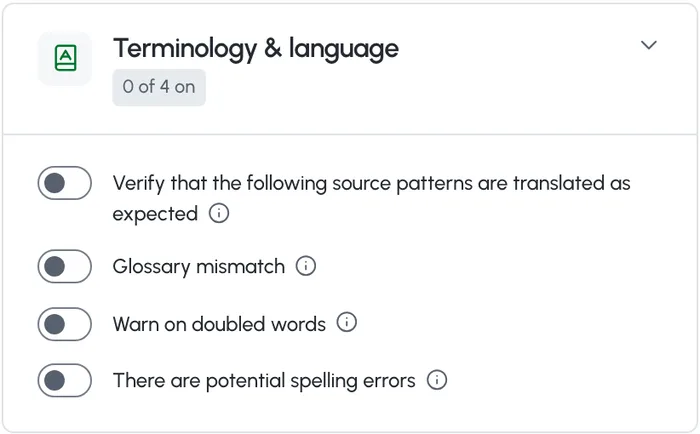
The QA check runs rule-based checks on tags, numbers, whitespace, length, glossary terms and spelling. Smells, the wxrks AI check, reads each segment for meaning, including what was changed, dropped or added.

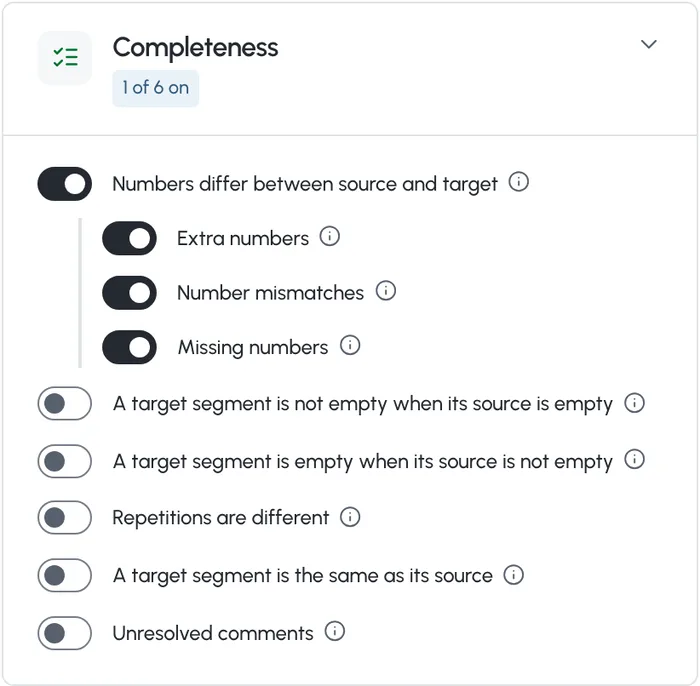
  • Numbers that differ between source and target, empty targets, untranslated text and unresolved comments are flagged.
  • Glossary mismatches and possible spelling errors, with an exception list for your own words.
  • A character limit from your source file, soft or hard. With hard enforcement, a segment over the limit can’t be confirmed.
  • The QA check points reviewers at the segments worth a second look. It never blocks delivery on its own.
Quality and Review settings: Smells (AI) runs together with the QA check to flag possible meaning deviations, omissions and other errors, with Enable Smells on
Completeness checks: numbers that differ between source and target, extra, mismatched and missing numbers, empty targets, repetitions that differ, targets the same as the source, unresolved comments Terminology and language checks: source patterns translated as expected, glossary mismatch, doubled words and potential spelling errors
Smells Scoring. Score by your rules. A 54-second film from wxrks.

02 Score

One Score per Segment, Weighted by Your Rules

Smells gives each segment a Confidence Score, the weight of its worst open problem, and 100% when there is none. You set what each severity costs, from Blocker to Info, or start from a preset such as MQM-style.

  • Green from 80%, orange from 50% to 79%, red below 50%. Linguists can filter segments by their score.
  • One serious problem is enough to hold a segment back. Problems are not averaged away.
  • Preview new weights on your last 90 days before you save, at no AI cost.

How Smells Scoring works

03 Route

Send Each Translation Where Its Risk Says

Your rules decide what confirms on its own and what goes to a person. Set them once for the account, then make them stricter for the units and projects that carry more risk.
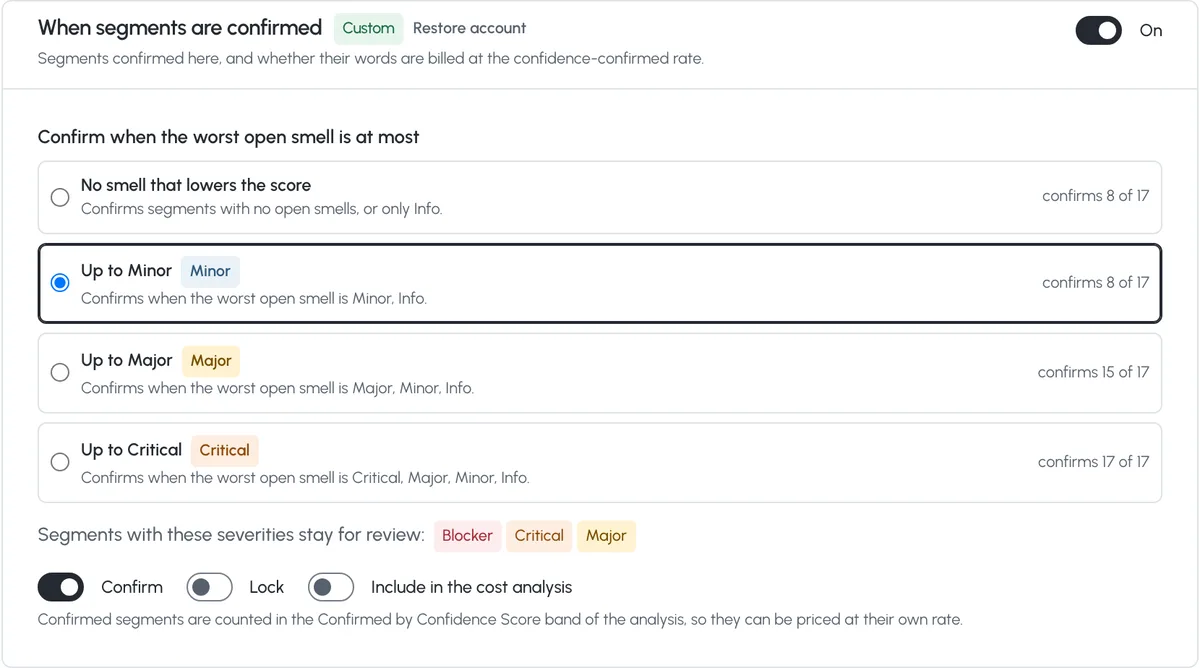
Confirm what is clean, hold the rest

  • Pick the worst problem a segment may still have and be confirmed. Each option shows how many of your recent segments it would confirm.
  • Below your line, a segment stays open for a linguist. Editing a confirmed segment takes its approval away.
  • A task can’t be delivered until every segment is confirmed, and a tag check runs before it goes.
When segments are confirmed, customized for one organizational unit: Up to Minor confirms 8 of 17 recent segments, Up to Major 15 and Up to Critical 17
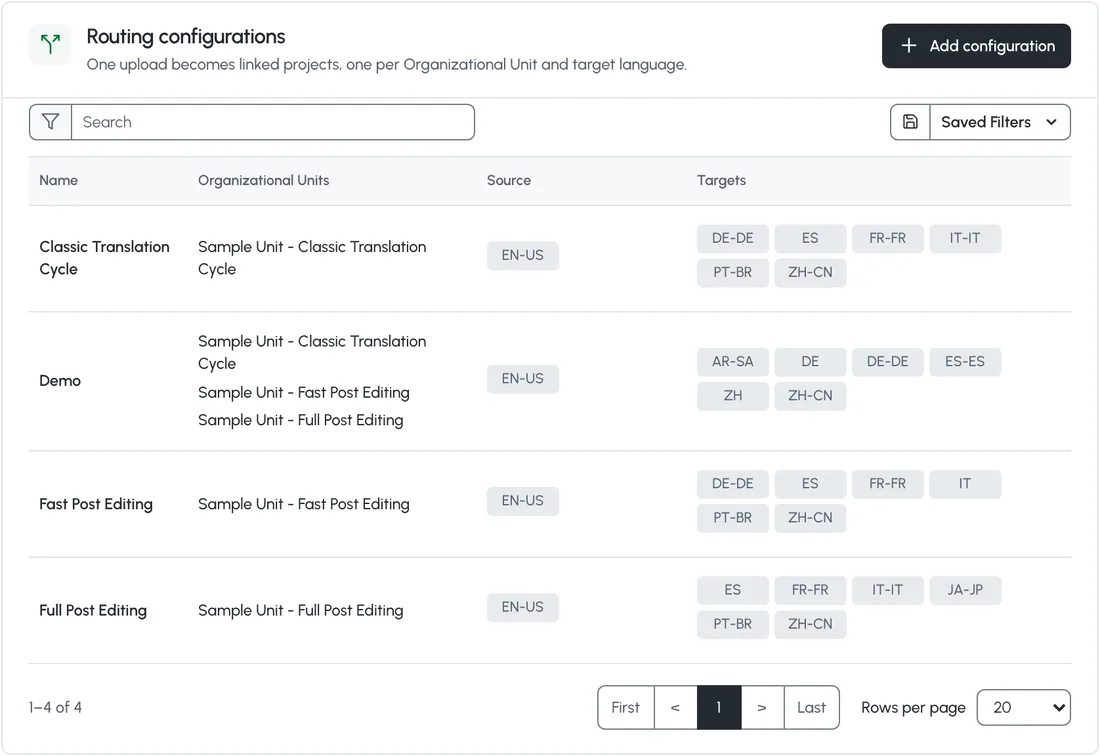
Project routing configurations: one upload splits into linked projects per organizational unit and target language, with units for Classic Translation Cycle, Fast Post Editing and Full Post Editing

Give each kind of content its own workflow

  • Project routing splits one upload into linked projects, one per unit and target language, and each unit brings its own workflow.
  • Support articles can go through light post-editing while a launch or a contract goes through full post-editing and an expert review step.
  • File-based rules pick a workflow from the file type when no default is set.

Give the work to people with a record

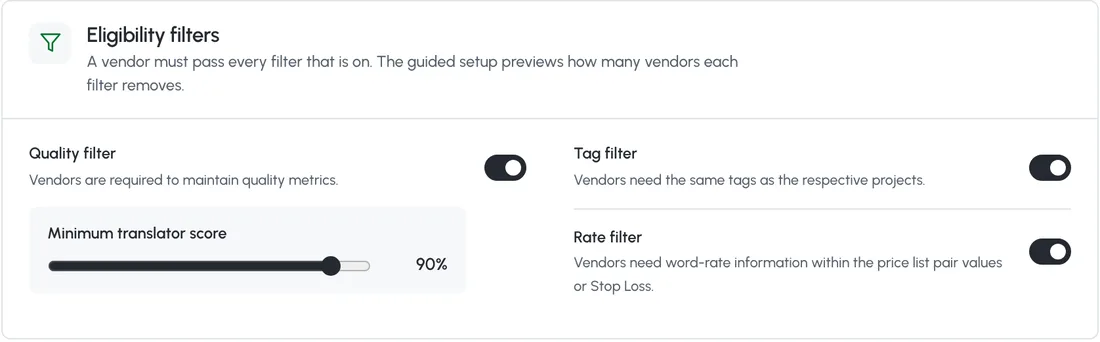
  • With the quality filter on, only vendors above your minimum translator score see a task. The guided setup starts at 60%, or 80% for Strict.
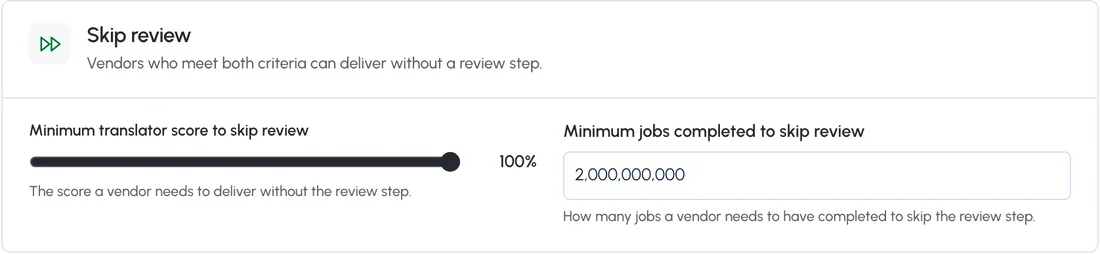
  • Skip review only for vendors above a score you set, with a minimum number of completed jobs.
  • Sequential restriction stops one vendor from translating and then reviewing the same file.
Auto Task Placement eligibility filters: a quality filter with a minimum translator score of 90%, a tag filter and a rate filter Skip review: vendors who meet a minimum translator score and a minimum number of completed jobs can deliver without a review step
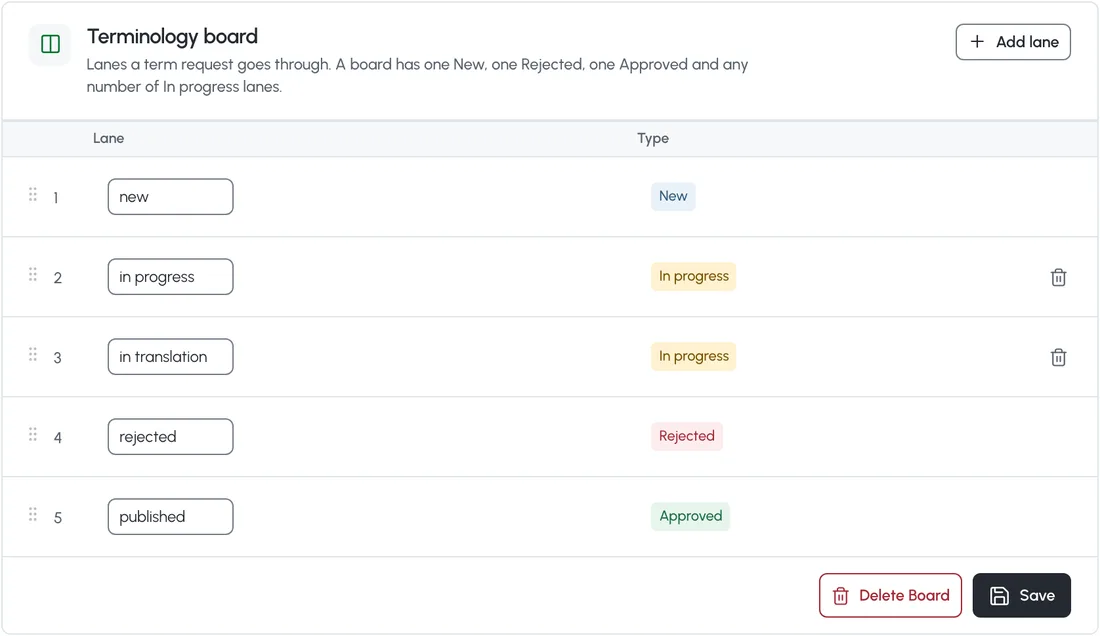
Terminology Board lanes: new, in progress, in translation, rejected and published, the path a requested term takes before it reaches the glossary

Approved words

Keep Approved Words Exactly as Approved

Risk often sits in a handful of words: a product name, a regulated claim, a legal phrase. wxrks keeps them where your team put them.

  • Exact matches from your translation memory can confirm or lock as they arrive. Linguists can’t edit a locked segment.
  • A requested term goes through the Terminology Board, from new to approved, before it reaches the glossary.
  • Required fields stop a term from being saved or approved without its definition, usage or note.
  • Block any AI action, Proofread included, for the account, a unit or a project.

04 Review

Reviewers Record What They Change and Why

Any workflow step after translation is a review step. Each edit gets a category, and reviewers can add feedback to what they reviewed.
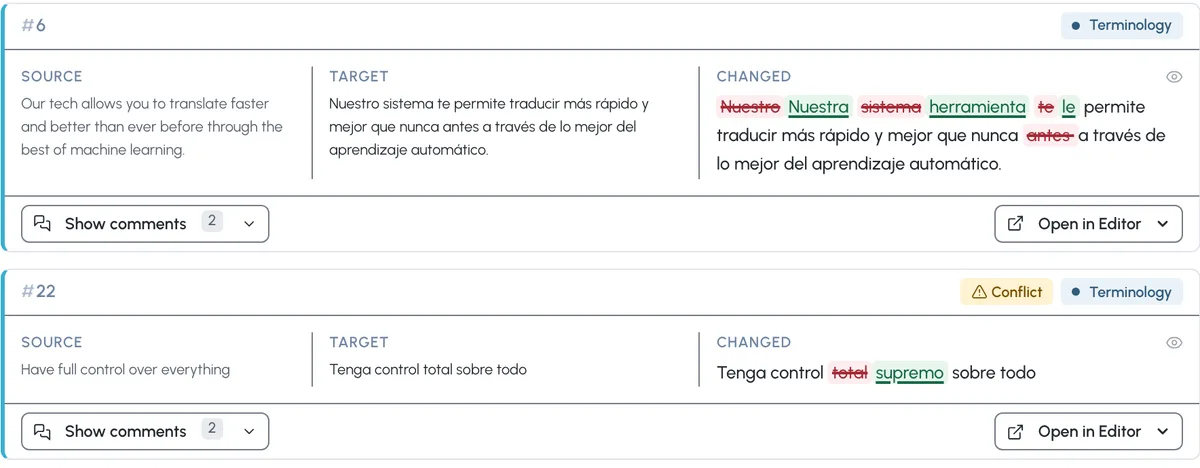
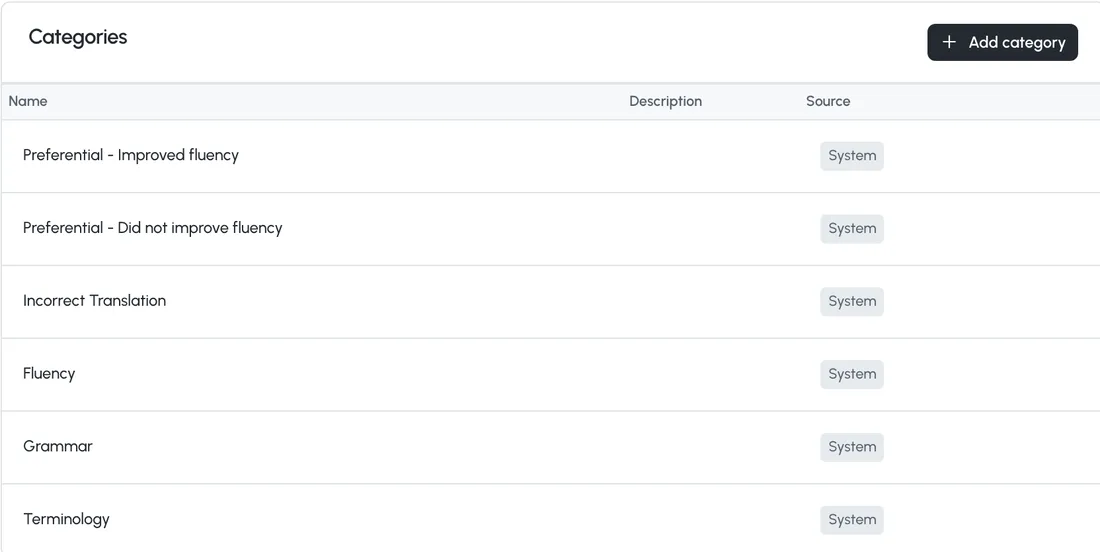
  • Incorrect translation, Terminology, Fluency and Grammar count against the translator’s quality index. Preferential changes are recorded and don’t count.
  • Add your own categories, or use only yours.
  • Review Assessment suggests a category and a short comment for each edit, and the reviewer can change both.
  • Files translated in the Portal can go to human review from the same screen, priced with your unit’s price list.
Two reviewed segments in Spanish with the reviewer's changes as tracked edits, each categorized as Terminology, one marked as a conflict Review categories: Preferential, improved fluency; Preferential, did not improve fluency; Incorrect Translation; Fluency; Grammar; Terminology; with Add category
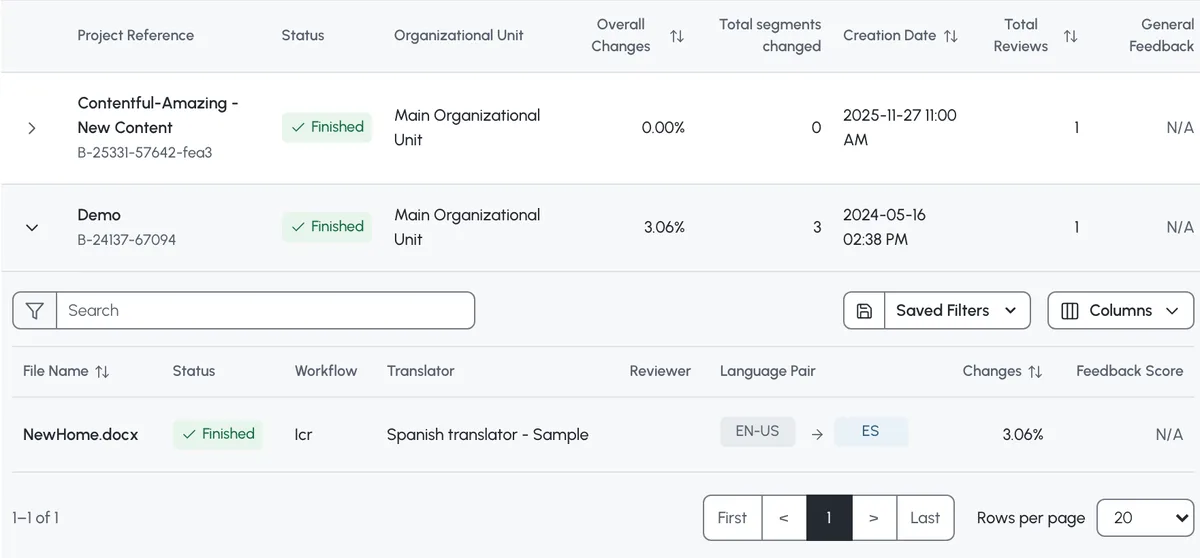
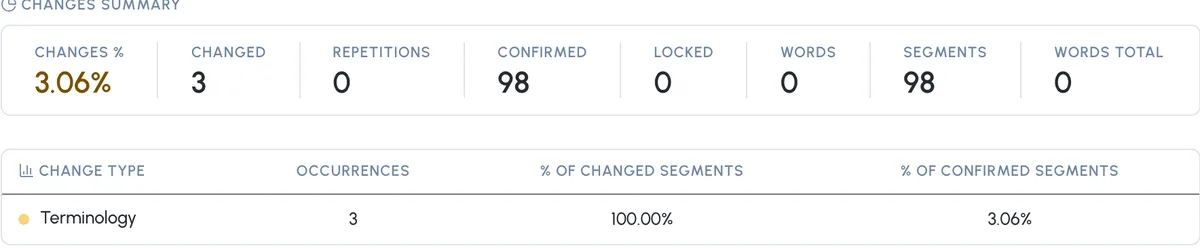
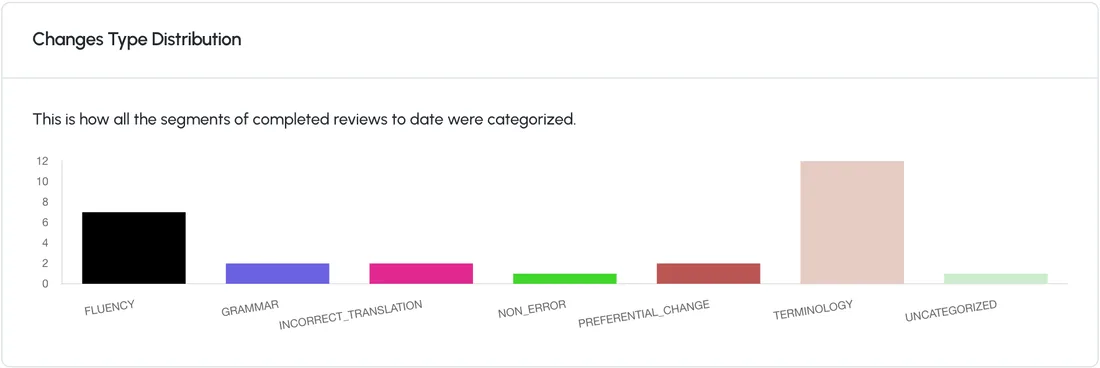
Quality Reviews: each project with the share of segments changed, and each reviewed file with its workflow, translator, language pair and changes A file's changes summary: 3.06% changed, 3 segments, 98 confirmed, all three changes categorized as Terminology Quality Dashboard: how the segments of completed reviews were categorized, by change type

05 Record

See Who Changed What, Step by Step

Every edit a reviewer makes is recorded, labeled with its reason, and rolled up into reports you and your vendors can come back to.

  • Each reviewed file shows its changes as tracked edits, with the category and the reviewer’s comments.
  • Export Quality Reports to Excel with the tracked changes, one at a time or up to 50 in one download.
  • The Quality Dashboard breaks changes down by category and language pair.
  • In the editor, each translation shows where it came from: memory, machine translation, AI or glossary.
  • A task’s history shows who it was given to, every status change, and edits to its due date and instructions, with the value before and after.

Account, unit, project

Set Rules Once, Make Them Stricter Where Risk Is Higher

The account sets the defaults. An Organizational Unit, the part of your account a team, a client or a business unit works in, or a single project can change them.

QA checks

Each unit can keep its own checks, and you can copy a set to other units in one step.

AI actions

A block at the account applies to every unit and project below it, and a lower level can’t turn it back on.

Editor settings

Lock up to 14 editor options for a unit or a project, for example Track changes always on for reviewers.
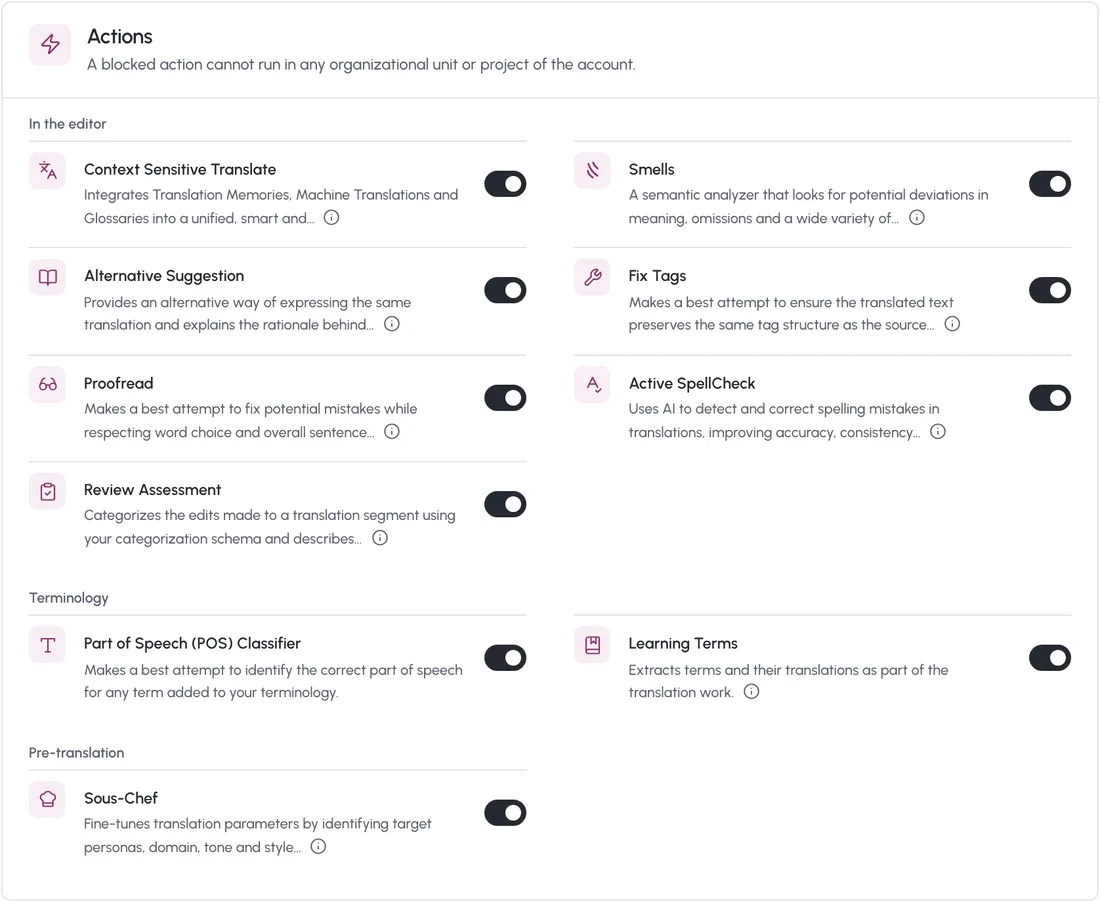
Augmented actions for the account: Context Sensitive Translate, Alternative Suggestion, Proofread, Review Assessment, Smells, Fix Tags, Active SpellCheck, the terminology actions and Sous-Chef, each with its own switch

Questions

Questions About Quality in wxrks

Does wxrks replace human review?

No. You decide what confirms on its own. Everything else stays open for a linguist and goes through the review steps of its workflow. For legal or regulated content, you can keep every segment for review.

Can high-risk content always go to a person?

Yes. Leave confirmation by score off for that unit or project, or route its files to a workflow with an expert review step.

Can the AI change a translation we already approved?

Not if you lock it. Linguists can’t edit a locked segment, and you can block AI actions such as Proofread for the account, a unit or a project.

Does the QA check stop a file from being delivered?

The QA check flags problems and never blocks delivery on its own. A task can’t be delivered until every segment is confirmed, and with a hard character limit, a segment over the limit can’t be confirmed.

Can we see who changed a translation?

Every reviewer edit is recorded with its category and comments, and Quality Reports export with tracked changes. In the editor, each translation shows whether it came from memory, machine translation, AI or a glossary.

Can we use our own error categories?

Yes. Add custom categories next to the system ones, or hide the system ones and use only yours.

Can we build our own quality reports?

Yes. Your account can have its own Analytics workspace in Metabase, with ready-made dashboards and quality and edit distance data for custom reports. Our team sets up the access.

What is TMill?

TMill cleans large translation memories. It finds entries in the wrong language, translations that change the meaning, and tag, term, spelling and grammar errors, and fixes or removes them. Today it runs with our team, on memories of a million entries or more.

Does our content train any model?

No. No customer content trains any model, and it is written into the data processing agreement.

How is wxrks priced?

By the volume you process, in one annual subscription. Your team, requesters and suppliers are not charged per seat. In enterprise plans, implementation, onboarding, training and asset import are included, so there is no first-year spike and no separate implementation invoice.

Book a demo

See Your Quality Rules on Your Own Content

A 15-minute call first. Then a 30-day proof of concept on your real content, at no cost.

  1. 1A 15-minute call. Pick a time on the next screen. No preparation needed.
  2. 230 days on your content. Your languages and up to three of your current suppliers, working as they would in production.
  3. 3Decide on numbers. Four measures agreed at the start, including how much your reviewers edit.
G2 Leader badgeNamed a Leader on G2for Translation Management Systems Independently audited (SOC 2 Type 2)
Hosted in the US or the EU
Coca-Cola Europacific Partners Uber Zendesk Omnicom Tag

Let’s make this demo actually useful for you. What’s your current role?

Email (must be a business email)

Almost done! Just a few quick questions and you’re good to go.

Thank you! Your submission has been received!
Oops! Something went wrong while submitting the form.